
Most enterprise cloud contact center migrations do not fail because of a lack of software features. They fail because of a breakdown during the structural handover. This is the critical, unmapped territory where next-generation cloud architectures collide with deeply rooted legacy corporate networks, historical data schemas, and established human workflows.
When executing an on-premise to cloud contact center migration for an operation that handles millions of interactions, treating the project as a simple software upgrade introduces severe operational risk. To secure a seamless transition and maximize operational efficiency, enterprise leadership must anchor their strategy around three critical pillars.
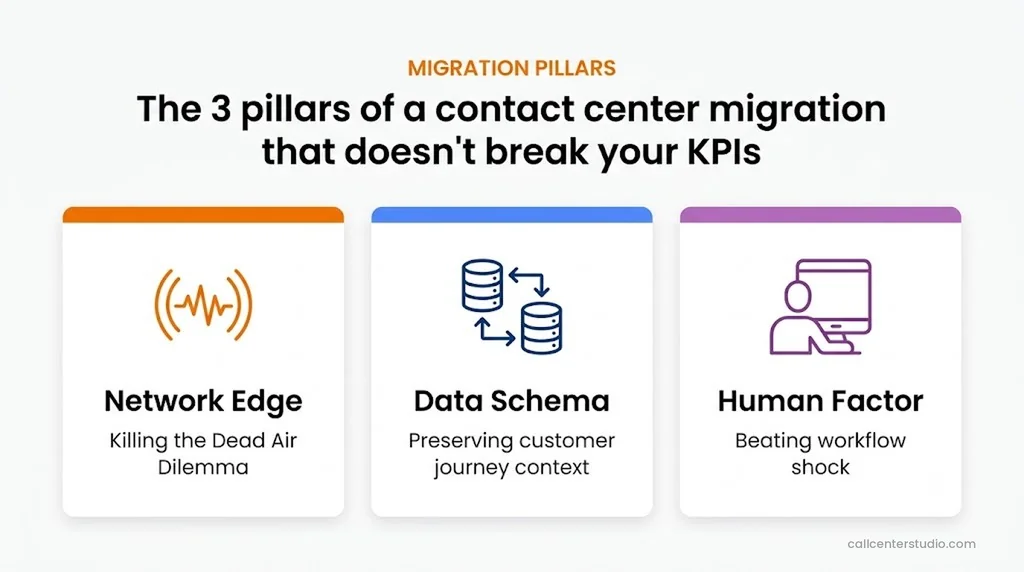
This guide outlines these pillars, cutting through the technical noise to provide a clear blueprint for protecting your metrics and reducing your Total Cost of Ownership (TCO) from Day 1.
Pillar 1: Overcoming “The Dead Air Dilemma”
Most global enterprises do not operate in a pure cloud vacuum. They maintain a hybrid reality where core customer databases, legacy ERP systems, or specialized data warehouses remain localized behind strict on-premise corporate firewalls.
However, during a live customer interaction, a cloud platform must instantly pull data from these on-premise environments to execute routing rules and load customer profiles. If your network engineering relies on standard corporate VPNs, this data journey creates a critical bottleneck.
This bottleneck causes a very specific, costly problem in enterprise operations: The agent answers the phone, the audio path is live, but the customer’s data grid or chat transcript fails to load.
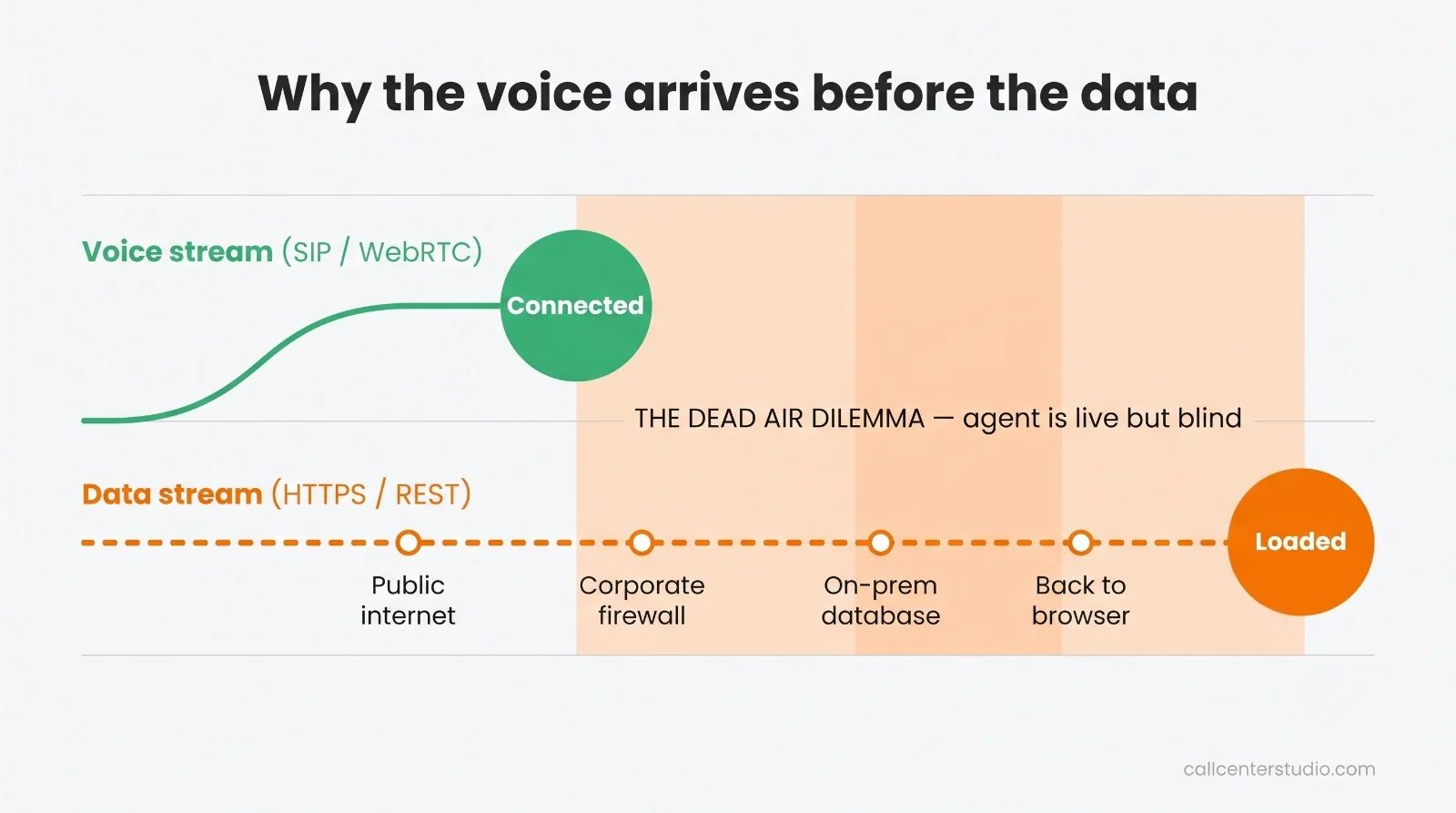
This is The Dead Air Dilemma. Because the lightweight voice stream connects instantly, but the heavy customer data layer lags behind, the agent is left completely blind.
In that case, they must either ask the customer to repeat their information or sit in awkward silence. Across millions of annual interactions, this delay:
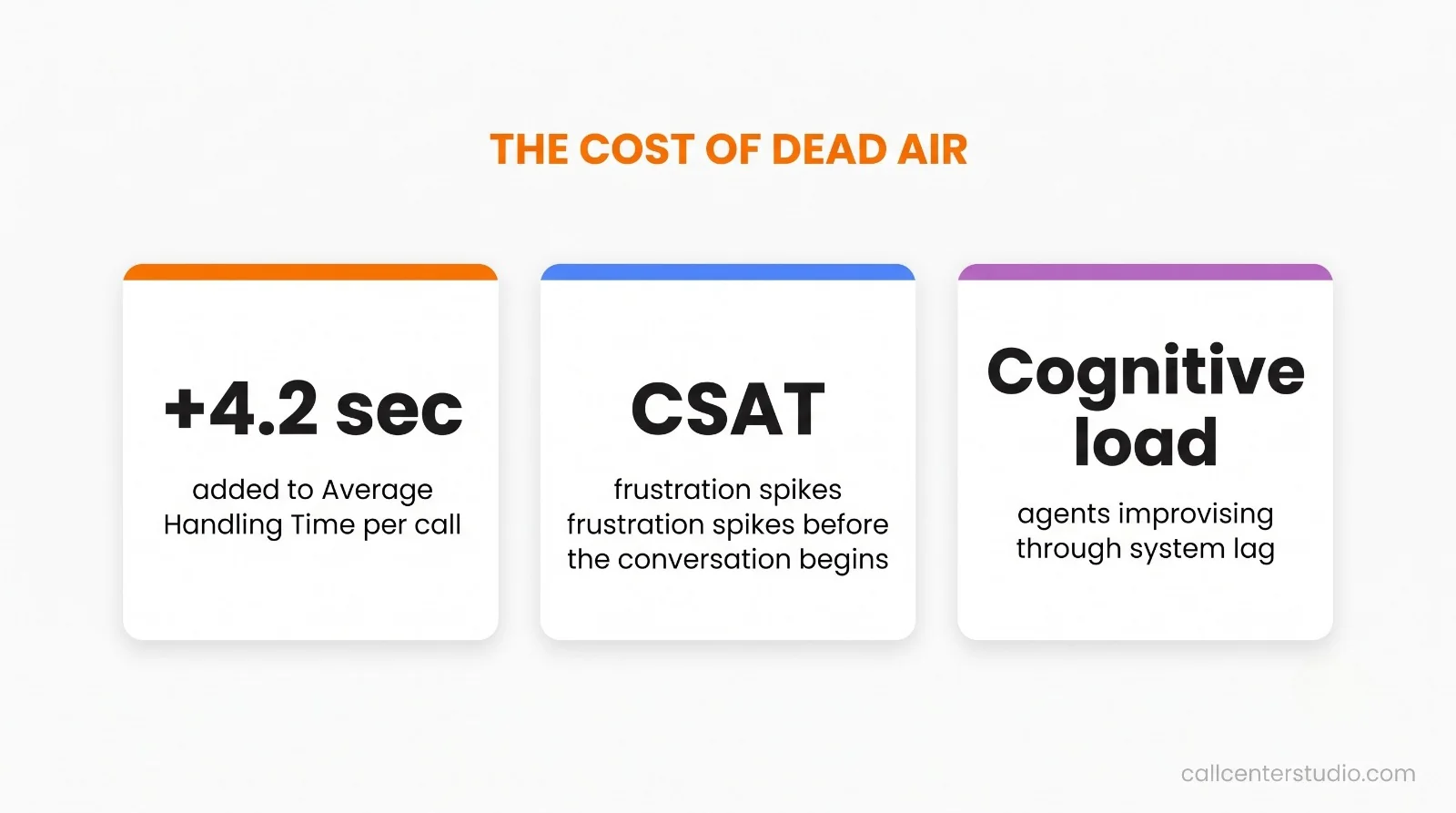
The Technical Deep-Dive: Why Voice and Data Desynchronize
This issue occurs because voice streams (SIP/WebRTC signaling) and enterprise data streams (HTTPS/REST requests) travel across different protocols and priority queues. When an agent answers a call, the voice path is established almost instantly via local telecommunication gateways.
However, the request to fetch the customer’s interaction history must travel from the cloud platform, across the public internet, pass through the corporate firewall, query an older on-premise database, and then travel all the way back to the agent’s browser window.
If your cloud communications architecture is not optimized specifically to give data dips a dedicated express lane, data desynchronization is guaranteed.
Step-by-Step Architectural Implementation Blueprint
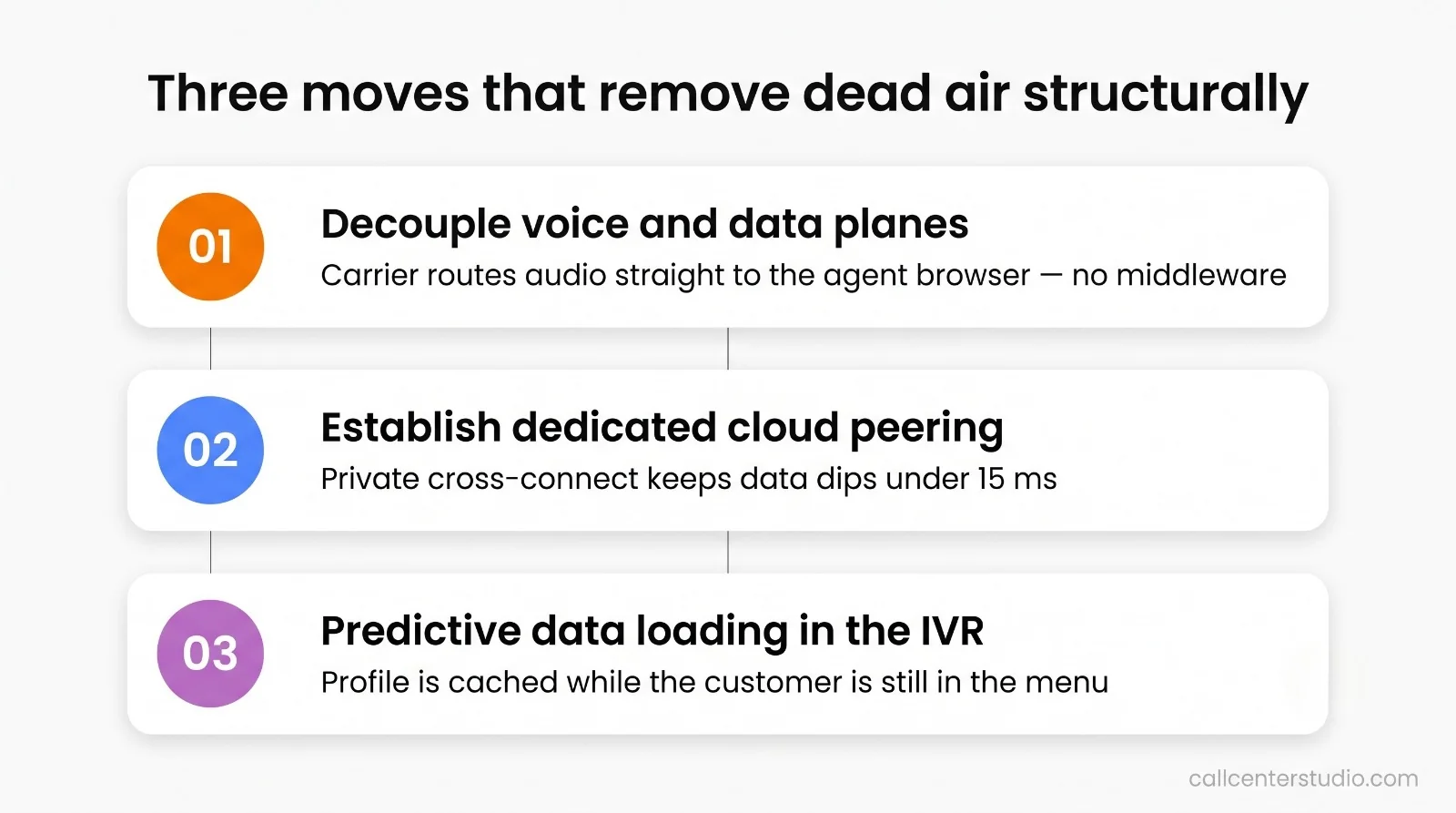
To structurally eradicate the Dead Air Dilemma, your enterprise IT infrastructure team must deploy a three-stage media and data pathway optimization plan to ensure a secure cloud architecture:
- Decouple the Voice and Data Planes (WebRTC Separation): Ensure the selected CCaaS platform utilizes a decentralized WebRTC architecture. The actual voice stream should route directly from the local telecom carrier to the agent’s web browser without passing through the cloud provider’s middleware processing layers. This keeps the voice path clean and responsive.
- Establish Dedicated Cloud Peering: Do not route critical backend data dips over the public internet or standard corporate VPN tunnels. The enterprise must mandate a private network cross-connect that directly links your cloud contact center environment to your physical corporate data centers. This keeps data-dip response times locked below a predictable 15-millisecond window.
- Deploy Asynchronous Predictive Data Loading: Configure the Interactive Voice Response (IVR) engine to trigger data dips while the customer is still navigating the automated menus, rather than waiting for the call to connect to an agent. By pre-fetching the data and holding it in a temporary secure cache, the customer profile is ready to display the exact millisecond the agent’s phone rings.
Pillar 2: Data Schema Mapping & Preserving Customer Journey Context
Migrating to the cloud requires moving years of historical interaction logs. Vendors often promise a “seamless data import,” but forcing old data structures into modern cloud environments without a plan will instantly ruin your reporting accuracy.
The Tabular vs. Event-Driven Schema Mismatch
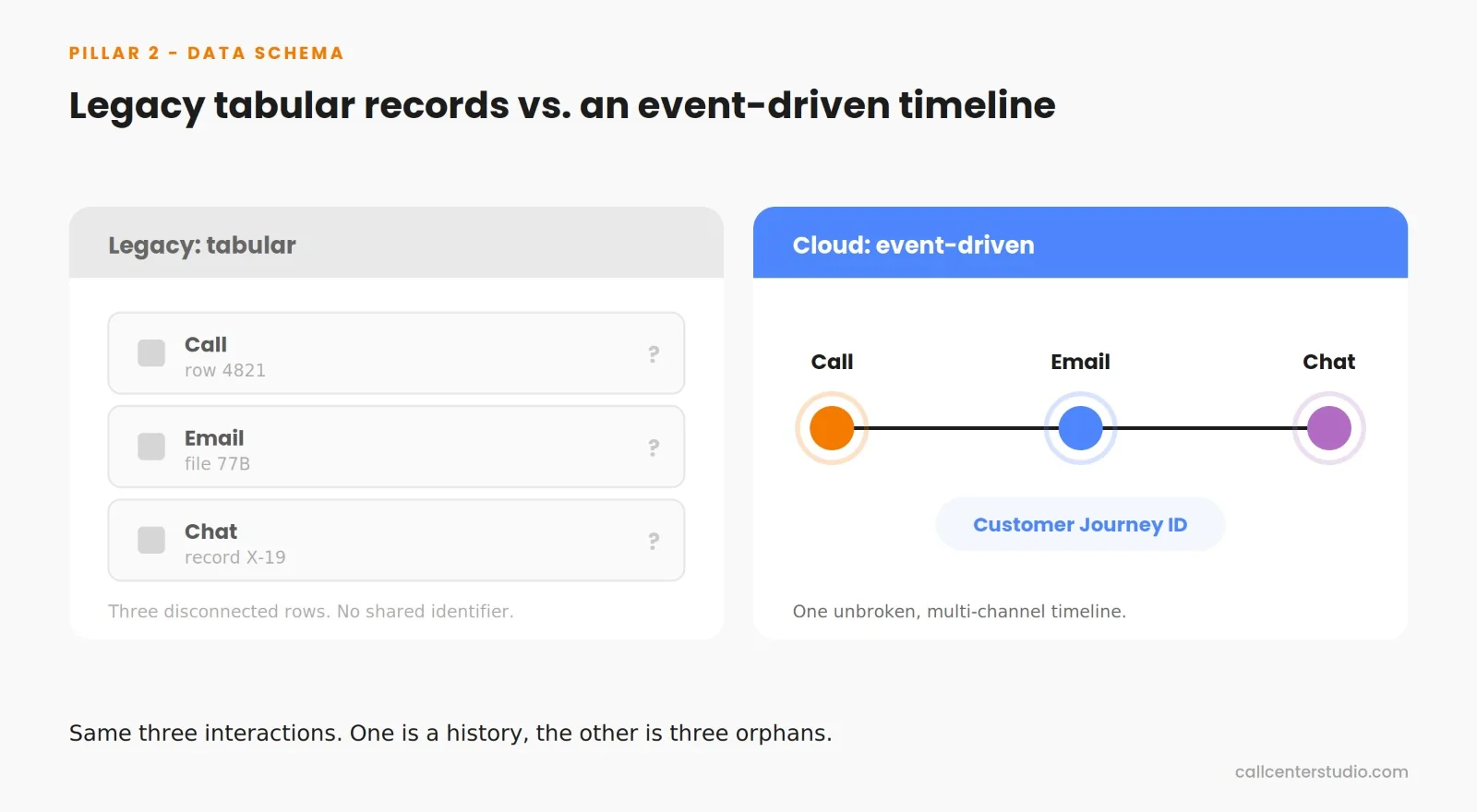
Legacy infrastructure systems store information in flat, disconnected tabular rows. In these old environments, a phone call is recorded as a single row, an email is generated as a completely separate file, and a web chat is stored in another database with an entirely different ID format. Modern cloud platforms, however, operate on an event-driven, graph-based architecture. They treat customer communication not as separate files, but as a single, continuous, multi-modal timeline bound to a unique Customer Journey ID.
If your data migration engineering is not meticulously planned, forcing these mismatched schemas together creates permanent data corruption and significant operational blind spots:
- Loss of Interaction Context: Custom disposition codes, supervisor wrap-up notes, and cross-channel switching histories from past years become detached or unreadable. When an agent opens an old record, they see that a customer contacted support, but the critical context—why they called or how it was resolved—is permanently missing.
- Corrupted AI and Analytics Baselines: Modern Workforce Optimization (WFM) tools and predictive routing engines rely heavily on historical data to forecast future volume and agent schedules. If historical call durations, hold times, and queue routing steps are converted with minor formatting variations, your newly deployed AI tools will train on corrupted data, leading to inaccurate staffing schedules and broken operational metrics.
Step-by-Step Architectural Implementation Blueprint
To ensure absolute data integrity and preserve your historical reporting value, your data engineering group must enforce a strict transition protocol:
- Develop a Comprehensive Schema Translation Matrix: Document exactly how every legacy flat call detail record (CDR) converts into a modern cloud event log. Map out variables such as call hold-time codes, agent ID transitions, and multi-channel transcripts to guarantee zero data truncation.
- Execute a Sandboxed ETL (Extract, Transform, Load) Audit: Before turning off your legacy hardware, run a test migration in an isolated sandbox environment using a minimum of 100,000 historical records spanning at least three years of operations. Validate that all historical metrics, supervisor notes, and customer touchpoints display accurately.
- Retroactive Customer Journey ID Mapping: Systematically group related legacy interaction rows together and assign them a unique, retroactive journey identifier. This process ensures that when your new platform goes live, your customer history profiles present an unbroken, multi-channel timeline from Day 1.

Pillar 3: Human Factor Engineering & Overcoming Workflow Shock
A cloud platform is only as effective as the agents using it. Shifting hundreds of agents from a system they have used for years to a completely new interface introduces immediate cognitive overload, known as workflow shock.
The technical and architectural superiority of a new cloud contact center platform is entirely irrelevant if your front-line operations team rejects the interface. Moving hundreds or thousands of agents from a legacy PBX system they have spent years mastering to a completely new desktop workspace introduces intense cognitive load, universally known as workflow shock.
The Anatomy of Workflow Shock
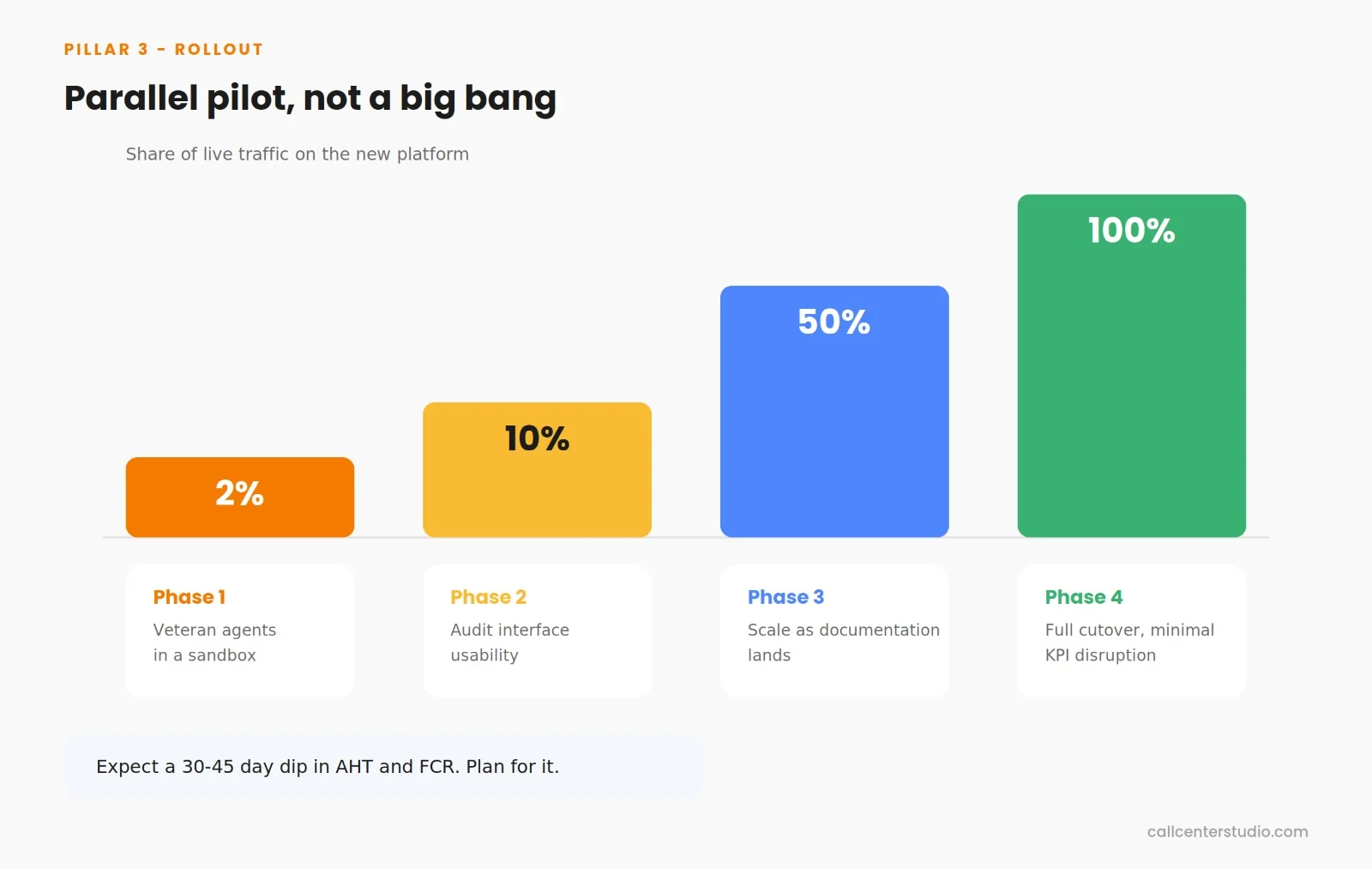
When an enterprise changes its core customer service software, key performance metrics typically experience a sharp drop during the first 30 to 45 days. Average Handling Time (AHT) rises and First Contact Resolution (FCR) drops, not because the new cloud software is slow, but because the agents have completely lost their muscle memory.
If the new cloud-native user interface requires more clicks to transfer an interaction, find a customer’s history, or close a post-call wrap-up panel than the legacy software did, agent frustration spikes. In high-volume enterprise environments, this friction quickly leads to severe agent burnout and sudden employee turnover, pulling human resources into costly, disruptive recruitment and retraining cycles.
Step-by-Step Architectural Implementation Blueprint
To manage the human element of your legacy to cloud transition and protect your operational KPIs, your deployment plan must incorporate targeted Human Factor Engineering (HFE) frameworks:
1. Deploy a Structured Parallel Pilot Program: Avoid a risky “big bang” switchover where your entire workforce moves to the new system overnight. Establish a multi-phase roll-out schedule over 4 Phases:
2. Interface Minimization & Ergonomic Cleanliness: Leverage your platform’s low-code/no-code interface tools to strip away non-essential buttons, visual badges, and irrelevant tabs. The agent desktop must dynamically adapt to the state of the interaction, presenting only the specific information and action targets required for that precise moment in the customer conversation.
THE POST-EVALUATION PROCUREMENT CHECKLIST
Use this scorecard during vendor presentations to validate execution readiness after you have selected your top candidates.
1. Network Edge & Connectivity
- [ ] Does the platform separate voice streams from data signaling to prevent loading delays on the agent’s screen?
- [ ] Does the vendor offer private network cross-connects to bypass the public internet?
- [ ] Can the platform automatically adjust voice codecs in real time if an agent’s local internet bandwidth drops?
- [ ] Are all voice streams and data pathways fully encrypted using TLS and SRTP to meet strict enterprise compliance standards?
2. Data & Reporting Integrity
- [ ] Has the vendor provided a clear map showing how legacy call records convert into modern, event-driven timelines?
- [ ] Can the platform stream live interaction data down to the millisecond into your internal corporate data warehouse?
- [ ] Does the migration process preserve custom historical notes and agent performance metrics without losing data?
- [ ] Does the platform natively support PCI-DSS compliance and automated PII masking for both voice logs and text transcripts?
3. Agent Interface & Operational Transition
- [ ] Does the workspace consolidate tools, CRM records, and internal chats into a single browser window, completely eliminating screen toggling?
- [ ] Can your operations team easily redesign the layout for different agent teams using visual tools, without needing a software developer?
- [ ] Does the routing engine support precise traffic splitting to allow safe, gradual testing with small groups of agents?
6. Turning Strategy into Value: Why Market Leaders Choose Call Center Studio
Enterprise contact center modernization is fundamentally a commitment to long-term business agility. Modern omnichannel contact center frameworks must be designed from the ground up for deep system integration, consistent uptime, and flexible cost control.
This is precisely where Call Center Studio redefines the enterprise cloud transition.
As the WhatsApp-first, cloud-native contact center software built directly on Google Cloud Platform (GCP), Call Center Studio breaks the constraints of legacy infrastructure through a highly scalable, serverless microservices architecture.
- Eliminating Network Latency: By connecting a cloud-native framework directly with your live CRM and ERP data layers, Call Center Studio bypasses unoptimized network paths. This completely eliminates edge-case latency and ensures instant screen pops for agents.
- Empowering Business Operations: The intuitive, low-code visual call flow builder allows internal operational teams to modify complex routing schemes and multi-channel integration pathways instantly—without developer intervention or expensive professional service fees.
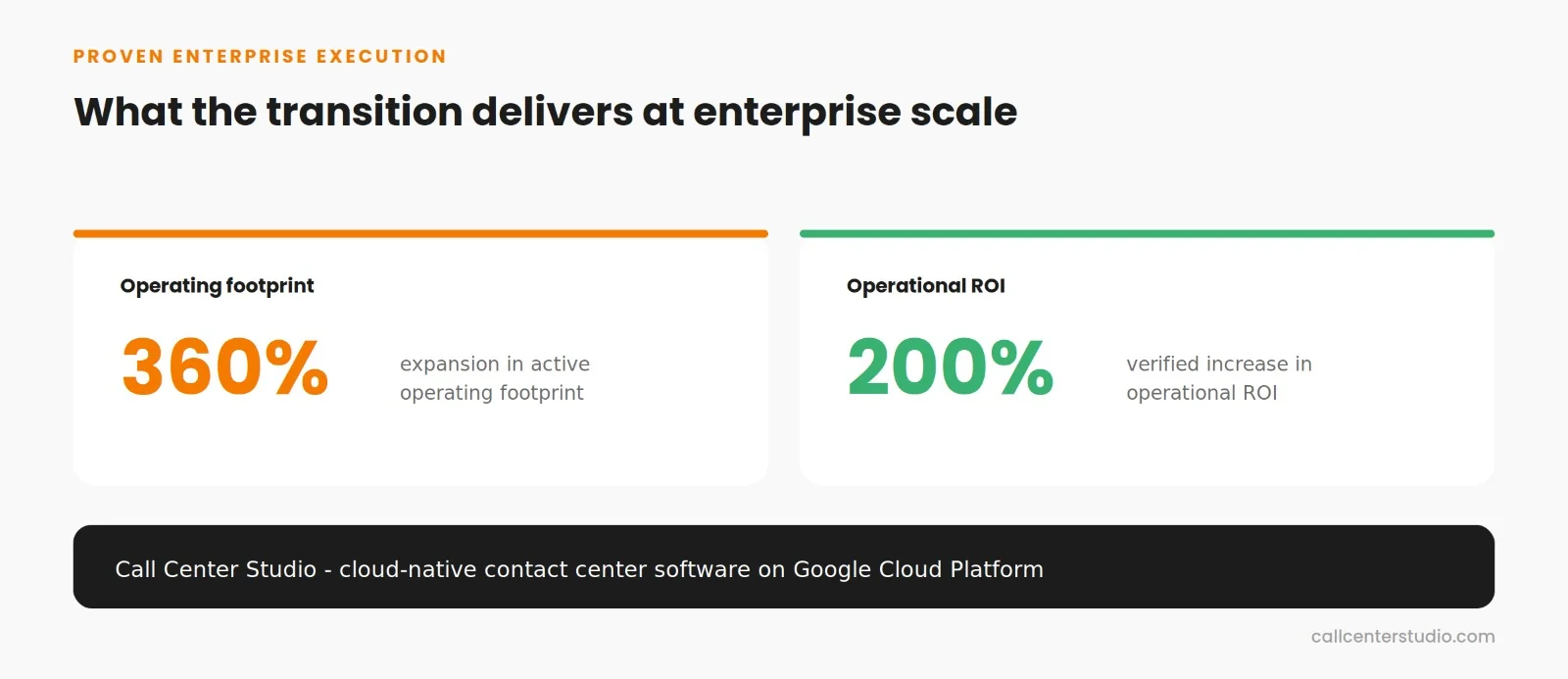
- Proven Enterprise Execution: This exact structural transition has enabled global commerce giants to expand their active operating footprint by 360%, remove agent desktop friction entirely, and realize a verified 200% increase in operational ROI.
Do not allow undocumented network friction, broken data histories, or workflow shock to compromise your Enterprise Customer Experience (CX) transformation.
To initiate a precise network edge test, construct a custom data migration map for your existing database, or see a live demonstration of Call Center Studio’s serverless architecture, select the engagement protocol below.
💬 Request an Enterprise Operational Demo