

A customer starts a conversation on WhatsApp, follows up by email, and eventually calls when they still haven’t received a response. If those interactions live in separate systems, your agents lose context, and your customers lose confidence.
In this guide, we’ll explore how omnichannel contact center software brings every conversation into one place, what it really means beyond simply supporting multiple channels, and what to look for before choosing a solution.
What Is an Omnichannel Contact Center?
An omnichannel contact center connects every channel a customer might use
- voice,
- live chat,
- email,
- WhatsApp, and
- social messaging
through a shared data layer. Whoever picks up the next interaction, on any channel, sees what happened before.
However, a contact center can run five channels and still make customers repeat themselves at every handoff, because the channels aren’t actually the thing that matters. But the data behind them is.
ICMI covered this exact failure pattern in a February 2026 piece by contributor Nick Glimsdahl. He described a retail contact center that considered itself fully omnichannel:
- Chat sat in one platform,
- SMS lived with a separate provider, and
- CRM notes varied in quality depending on which agent wrote them.
A customer moved from chat to SMS to a phone call over a single delivery issue, repeating her problem to three different agents along the way. ICMI’s conclusion was direct. The channels weren’t the issue. The missing piece was a customer profile that traveled with her.
That’s the working definition to buy against: omnichannel is whether context survives the handoff between them.
Omnichannel vs. Multichannel
Multichannel means a business offers several ways to get in touch (phone, email, chat, maybe WhatsApp), but each one runs as its own silo.
A customer who emails support and calls an hour later is, as far as the system is concerned, a brand-new contact with no history attached.
Omnichannel keeps that history connected no matter which channel comes next.
A few practical differences:
- Customer record: Multichannel stores one profile per channel. Omnichannel stores one profile, period.
- Agent view: Multichannel agents see only their channel’s history. Omnichannel agents see the full journey.
- Reporting: Multichannel reports per channel. Omnichannel reports on the customer’s full path across channels.
- Customer experience: Multichannel asks the customer to repeat themselves. Omnichannel doesn’t.
The gap between omnichannel and multichannel systems isn’t cosmetic. Gartner’s 2025 research on customer service channel strategy found that customers perceive 62% of channel transitions as high effort.
Meaning the act of switching channels, separate from whatever the original issue was, wears customers down on its own. That’s the specific cost multichannel setups create, and omnichannel platforms are designed to remove.
Channels Supported: Voice, Chat, Email, WhatsApp, Social
A platform that calls itself omnichannel should support the channels your customers actually use. The easiest channels to add aren’t always the ones customers prefer.
At minimum, that means:
- Voice: inbound and outbound calling, plus IVR for self-service and call deflection
- Live chat: on the website or in-app, with the same routing rules as voice
- Email: tracked and routed like a ticket, not left in a shared inbox
- WhatsApp Business: for messaging-first customers and markets
- Social messaging: Instagram and Facebook Messenger, where support conversations increasingly start
Each of these needs to write to the same customer record for the “omnichannel” label to hold up. A CRM integration that only syncs voice and email, while WhatsApp sits in a separate app, has quietly rebuilt multichannel with extra steps.
WhatsApp and Messaging
WhatsApp conversations are naturally asynchronous. Customers reply when it’s convenient, and a single conversation can continue over hours or even days. That makes the channel ideal for order updates, appointment reminders, and simple support requests that don’t require an immediate response.
In many markets, the WhatsApp Business app is the first place customers reach out, often before email or a phone call. The right channel mix depends on your customers, which is why it should be a deliberate decision instead of a default.
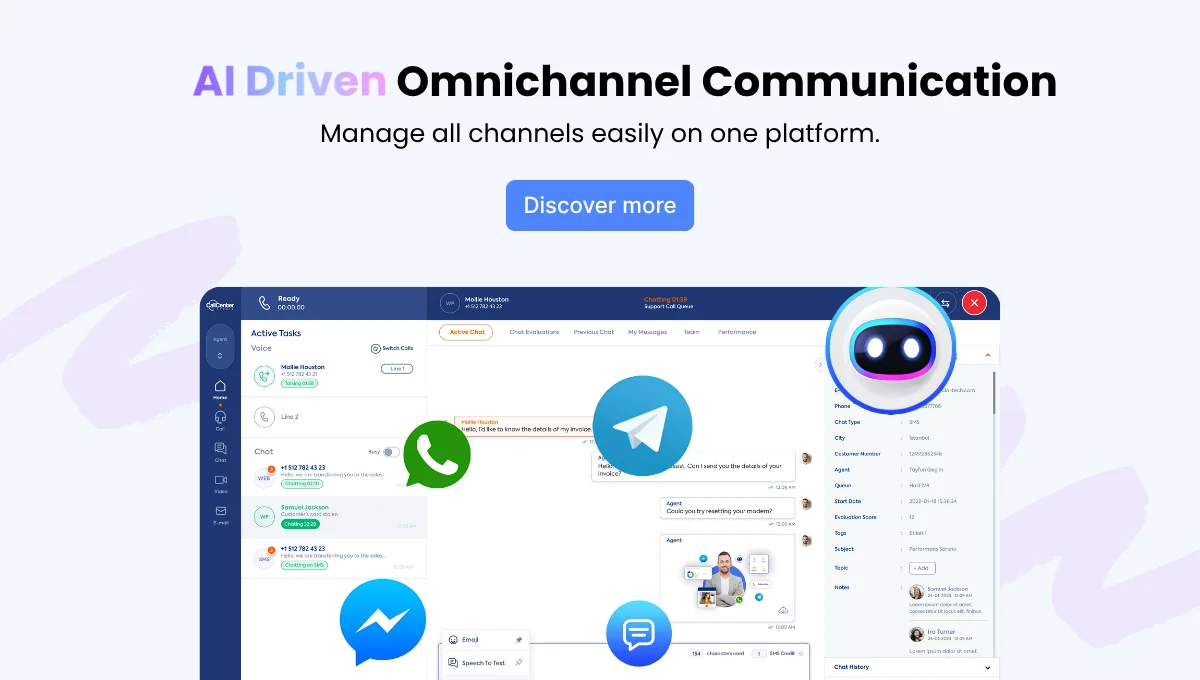
The integration question matters more than the channel itself, though. A WhatsApp thread that doesn’t share history with voice and chat is just another silo with a green icon.
Routing and the Unified Agent Desktop
Routing decides which agent picks up which conversation, and in an omnichannel setup, the same logic needs to apply everywhere. Skill, language, current workload, and customer priority should route a WhatsApp message the same way they route an inbound call. Not through a separate, looser set of rules because it’s “just chat.”
The agent desktop is where this either holds together or falls apart. If an agent needs four open tabs to see one customer’s voice, chat, email, and WhatsApp history, the platform isn’t unified. It’s four platforms sharing a login screen, and agents feel that seam every time a conversation moves between channels.
COPC’s Customer Experience Standard, now in its seventh release, was updated specifically to address this gap. The standard has guided contact center operations for close to three decades, and its most recent version added new roles, measurements, and processes built around managing digital channels alongside voice — rather than treating chat, social, and messaging as an afterthought bolted onto a voice-first operation.
Combined with IVR for pre-routing and self-service deflection, a properly unified desktop means an agent never has to ask “which system do I check for that?”
AI and Automation Across Every Channel
AI in a contact center usually shows up in one of three places:
- Routing decisions
- Agent-assist suggestions during a live conversation, or
- Self-service that resolves simple requests without an agent at all
On an omnichannel platform, all three need to work consistently.
It’s worth being honest about what AI replaces and what it doesn’t. Metrigy’s Customer Experience Optimization 2025-26 report found that 84.7% of consumers, given a choice, still prefer a human agent over an AI one.
Even when told the AI could fully resolve their issue, 80.1% still picked a person.
That’s not an argument against AI investment. It’s an argument for targeting it correctly.
That’s why AI works best when it’s applied where it creates the most value. Handling routine requests such as order updates, password resets, and FAQs frees agents to focus on the conversations that require human judgment, regardless of the channel.
Reporting Across Channels
A dashboard that shows call metrics in one place and chat metrics in another isn’t measuring omnichannel performance. It’s measuring separate operations.
True cross-channel reporting combines metrics like:
- First Contact Resolution (FCR)
- Customer Satisfaction (CSAT)
- Average Handle Time (AHT)
This ensures a WhatsApp conversation and a phone call are evaluated using the same standards.
SQM Group’s benchmarking methodology is one of the industry’s most established frameworks. It measures customer experience across call center, IVR, email, chat, web self-service, and mobile self-service, then compares results against more than 500 North American contact centers using a single standardized methodology.
That unified view also revealed a growing gap between FCR and CSAT: 8% in 2025, up from 4% in 2013. As self-service handles simpler requests, voice, chat, and WhatsApp are left with more complex issues. Without accounting for this shift, reporting can misinterpret satisfaction trends and unfairly evaluate agent performance.
Why Call Center Studio for Omnichannel?
Most omnichannel projects stall on integration.
Teams already know they want voice, chat, email, and WhatsApp on one platform. The sticking point is usually how long it takes to actually connect everything without a six-month implementation project eating up the budget.
Call Center Studio simplifies that process with a cloud-native platform that brings every channel together in one setup. AI is built into routing and agent assistance from the start, and transparent pricing helps businesses avoid unexpected add-on costs as they grow.
Setup Speed!
The practical test for any omnichannel vendor is simple: ask them to pull up one customer’s journey across three channels, live, on a single screen.
If they can, that’s omnichannel. If it takes switching between two products and a spreadsheet, it’s multichannel wearing an omnichannel label.
For teams comparing platforms directly, our comparison pages break down how Call Center Studio stacks up against other CCaaS providers on channel coverage, AI capability, and pricing structure.
See Call Center Studio in action! Request a Demo.
FAQ
What is omnichannel contact center software?
Omnichannel contact center software connects voice, chat, email, WhatsApp, and social messaging to one shared customer record, so agents see a customer’s full history regardless of which channel they’re using right now.
What is the difference between omnichannel and multichannel?
Multichannel means a business runs several separate channels that don’t share data, so customers often repeat their issue when they switch from one to another. Omnichannel keeps that context connected across every channel a customer uses.
Does omnichannel include WhatsApp?
Yes. A genuinely omnichannel platform treats WhatsApp Business messaging the same way it treats voice or live chat. Conversations are synced to the same customer profile and routed through the same rules as every other channel.
How does omnichannel routing work?
Routing rules apply consistently across channels based on agent skill, language, availability, and customer priority, regardless of whether the conversation started as a phone call, a chat message, or a WhatsApp text.
What features should omnichannel contact center software include?
At minimum, look for a shared customer record across channels, consistent routing rules regardless of channel, native AI for agent assist and self-service, and reporting that measures FCR, CSAT, and handle time the same way for every channel.
How long does it take to implement omnichannel contact center software?
Timelines depend on channel count and existing CRM complexity, but a cloud-native platform with prebuilt WhatsApp, chat, and voice integrations typically launches in weeks rather than the months a custom-built integration project usually takes.