
Good news for customer support: WhatsApp has launched a new feature for Business accounts!
You can now take WhatsApp calls along with your chats, social messages, and other voice channels.
In this article, we’ll explore the benefits of WhatsApp Business. We’ll also cover how to use and integrate Call Center Studio WhatsApp with your call centre system.
Whether you’re starting an omnichannel strategy or improving your current one, WhatsApp Business calling lets you:
- Make conversations with customers much easier.
- Give your agents the full picture so they’re never caught off guard.
- Keep tabs on every call and make things better over time.
Stay tuned as we roll this out.
What’s New: WhatsApp Business Calling, Minus the App Shuffle
No more nudging customers to “switch to a voice call” or sending them through various platforms. With WhatsApp direct call, the voice channel becomes native to the messaging experience.
- A call button will now appear in your WhatsApp chat window.
- Customers can call you directly through the app.
- You can manage all incoming calls within your platform.
It’s quick, seamless, and entirely familiar for your customers who already use WhatsApp.
For your team, it’s effortless support. For your customers, it’s instant answers.
Built for the Omnichannel Era
With the rollout of Call Center Studio, WhatsApp Business calling will be a key part of your customer communication platform. Because you are going to be able:
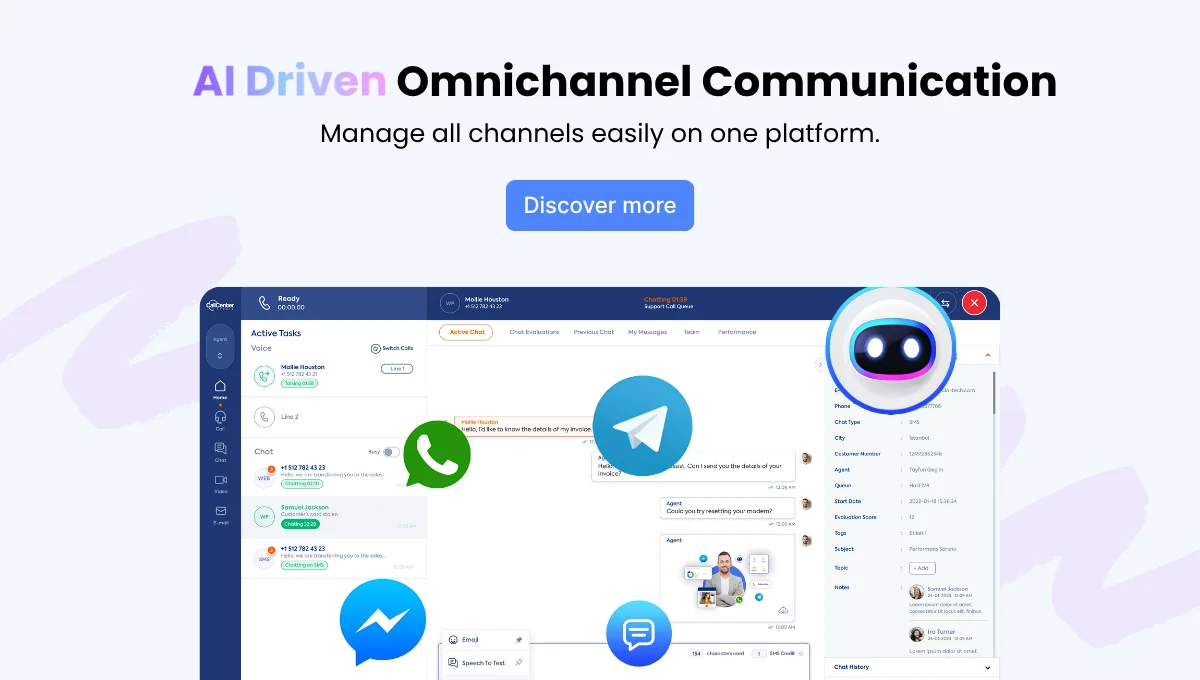
- Unify interface: Agents handle WhatsApp voice, chat, social, and regular calls in one screen.
- Stays intact: No need to ask, “Can you remind me what this was about?”
- Have smarter staffing: Supervisors get a real-time view of all channels. That means no more blind spots.
Think of it as upgrading from a walkie-talkie system to mission control. Everything is visible, connected, and actionable.
Design Smarter Call Flows with WhatsApp IVR Integration
You can route WhatsApp calls just like traditional ones. Connect to your current IVR system or set up call flows just for WhatsApp.
- Route by language, intent, or customer type
- Prioritize VIPs or repeat contacts
- Automate basic queries and triage before reaching a live agent
Imagine this: A customer starts by messaging a quick question. It gets a bit complex, so your agent switches to a call, right within the same WhatsApp thread. The issue gets solved in minutes.
That’s a frictionless, omnichannel contact center journey. And it’s how you turn average support into customer engagement gold.
Get the Data to Back It Up: WhatsApp Call Reporting
Visibility matters. Especially when scaling or coaching. Call Center Studio lets you access WhatsApp call reports and track agent performance. This means you can:
- Keep an eye on how fast your team responds and solves things.
- Spot where things are getting stuck or where your team might need a boost.
- Connect every call with your CRM or ticket system so that nothing slips through the cracks.
No more mystery metrics. Just actionable insights across every channel.
 How to Integrate WhatsApp with Call Center Studio: A Step-by-Step Guide
Bringing WhatsApp into your support flow is easier than you might think. Your guide on how to get it up and running fast:
Step 1: Set Up Your WhatsApp Business Account
- Get your business verified on WhatsApp.
- Apply for the WhatsApp Business API through Meta.
- Create a business profile with your details, logo, and bio.
Step 2: Connect Your Number via Call Center Studio
- Pick the number you want to use for WhatsApp.
- Our team will help you onboard through Meta’s partner flow.
- Verify the number and link it to your business account.
Step 3: Turn on WhatsApp in your settings
- Log in to your Call Center Studio admin panel.
- Go to Channel Management > WhatsApp.
- Connect your verified number and authorize us as your BSP.
Step 4: Set up WhatsApp call flows
- Use our IVR Designer to build or tweak your call flow.
- Add smart routing by language, time, or customer type.
- Create queues or assign to specific agent groups.
Step 5: Give it a test run
- Make a few test calls and chats to see how it flows.
- Make sure calls show up in the agent interface.
- Double-check CRM sync and reporting.
Step 6: Train up your team
- Walk your agents through the new WhatsApp call setup.
- Share quick tips on switching between chat and voice.
- Gather early feedback and adjust as needed.
Step 7: Launch & keep an eye on it
- Go live by sharing your WhatsApp number with customers.
- Use our dashboards to watch performance, calls, and engagement.
Summary
Integrating WhatsApp Business calling is the most strategic move you can take. Because you’re creating faster paths to resolution, tailored by channel. After you have this feature, you immediately have:
Bringing WhatsApp Business calling into your call center is a total game-changer in customer communication. Here’s what you get:
✔️Everything in One Place: Chat, voice, social. It’s all in a single dashboard, no juggling apps or tabs.
✔️Quick, Smart Support: Your agents can switch from text to voice during a chat. They have all the context they need.
✔️Real Insights, Real Fast: See the full picture of call performance. Spot what works and what doesn’t. Use meaningful data to improve your support.
Let’s get started together. Book your demo today.
During the demo, we will:
- Get to know you and your operations a little better.
- Discuss the challenges you’re looking to overcome.
- Plan the successes you’re looking to achieve.
- Tailor a walkthrough of the features that will help you the most.
- Define the next steps and plan out our journey together.