

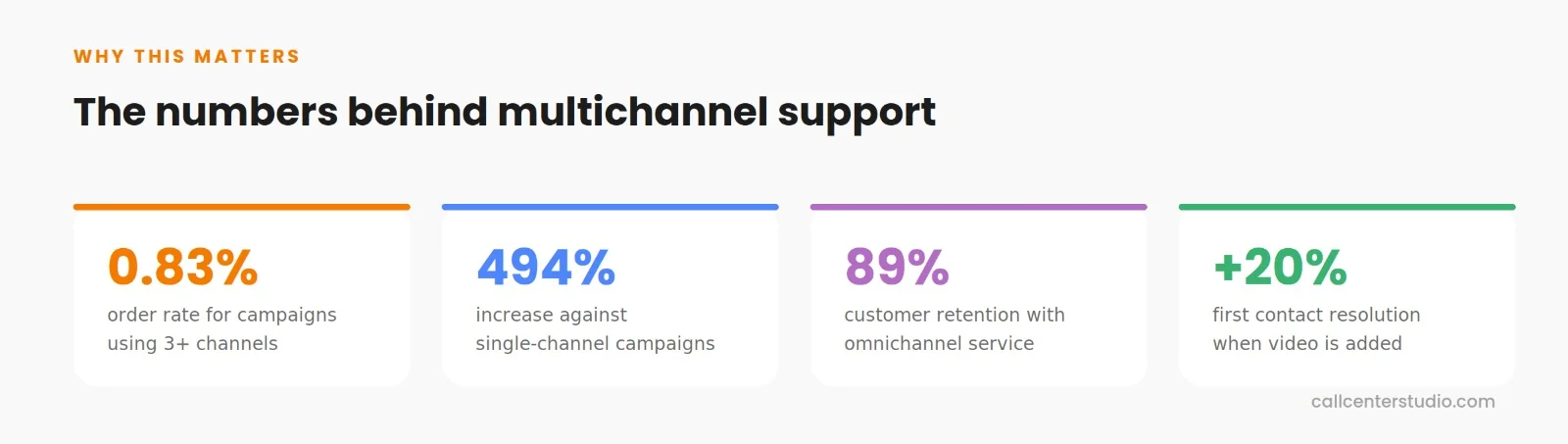
Campaigns using 3+ channels achieved a 0.83% order rate, representing a 494% increase. As stats show, the power of channels is unbelievable because they are providing exactly what customers want today: a real connection and fast problem-solving. That is why the omnichannel and multichannel solution creates “Thank you so much!” moments that can really make your KPIs and campaign shine.
In this article, we will focus on one of the most powerful channels in customer support: Video calls.
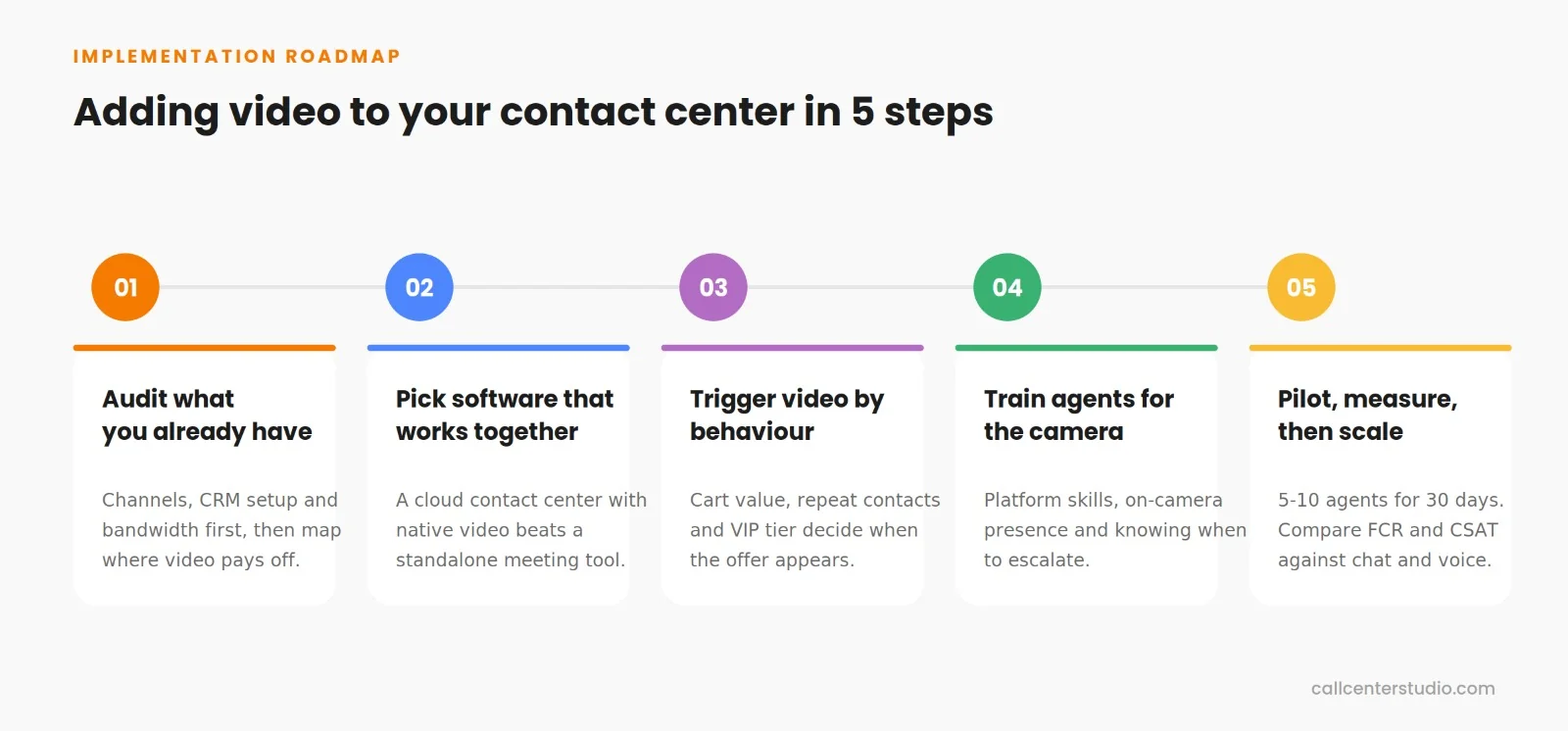
Let’s see how you can bring video chat into your contact center through a seamless, step-by-step roadmap.
P.S.: It’s way simpler than you might think.
Step 1: Figure Out What You’ve Got and Why You Need Video
You can’t build a new room without checking the house’s infrastructure first. Before you dive into buying software, the very first thing you need to do is audit your current foundation. Take a good look at what you’re working with right now:
- Your current communication channels
- Your CRM integrations and customer data setup, and
- Whether your internet bandwidth can handle secure video streaming.
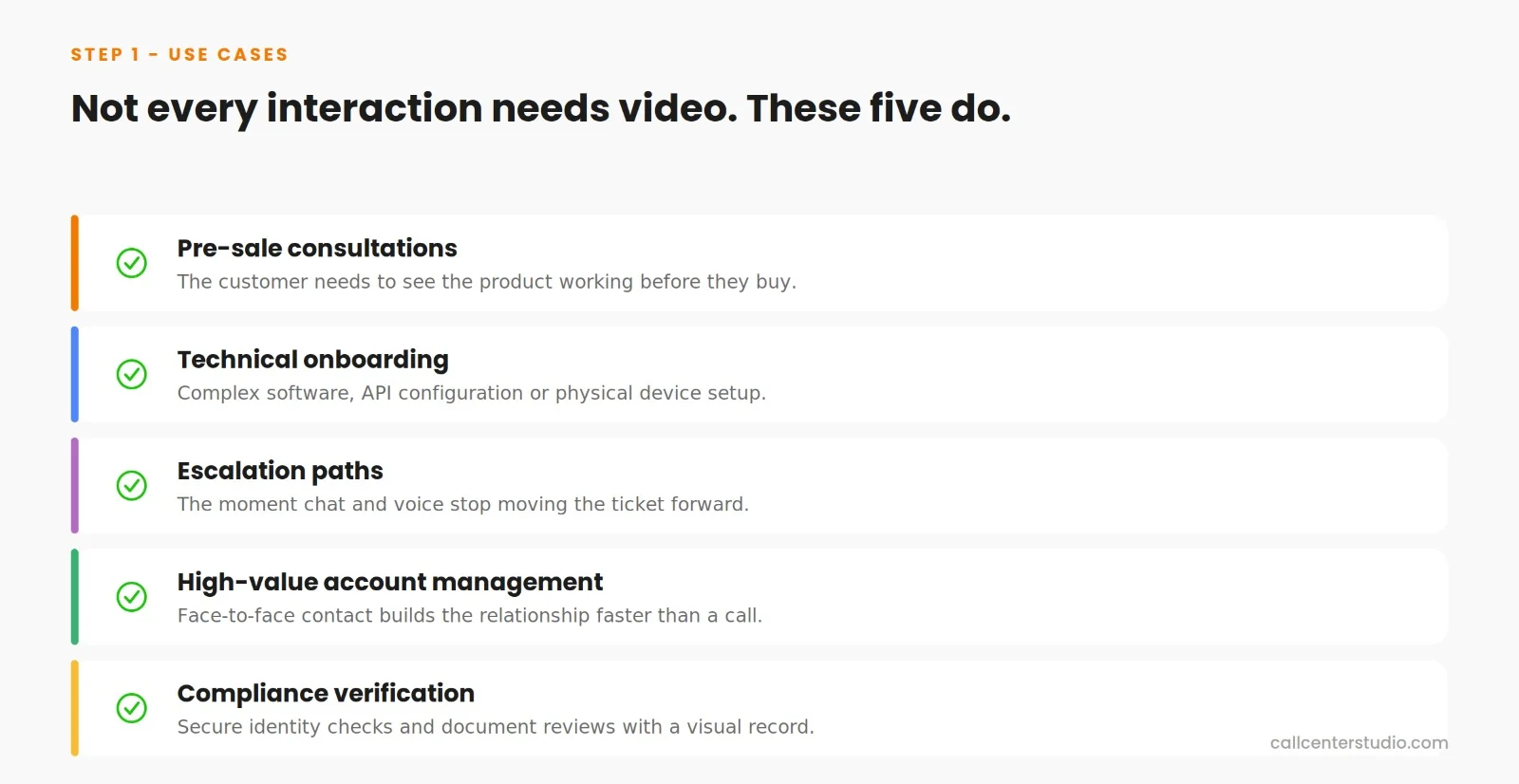
Now identify exactly where the video call service will give you the biggest bang for your buck. Because not every interaction needs video. Start by identifying where visual context and real-time interaction change everything. Example:
The tech requirements here are actually pretty minimal. Modern video support runs on browser-based WebRTC technology, which means customers can jump on a high-definition video call straight from their browser without downloading any apps or plugins. For your agents, all you need is a standard computer with a webcam, a decent headset, and a stable internet connection.
Bandwidth and hardware requirements for browser-based video support

Step 2: Pick Software That Actually Works Together
Now that you know your goals, it’s time to choose your tools. A common trap is picking a standalone video tool that isolates your team.
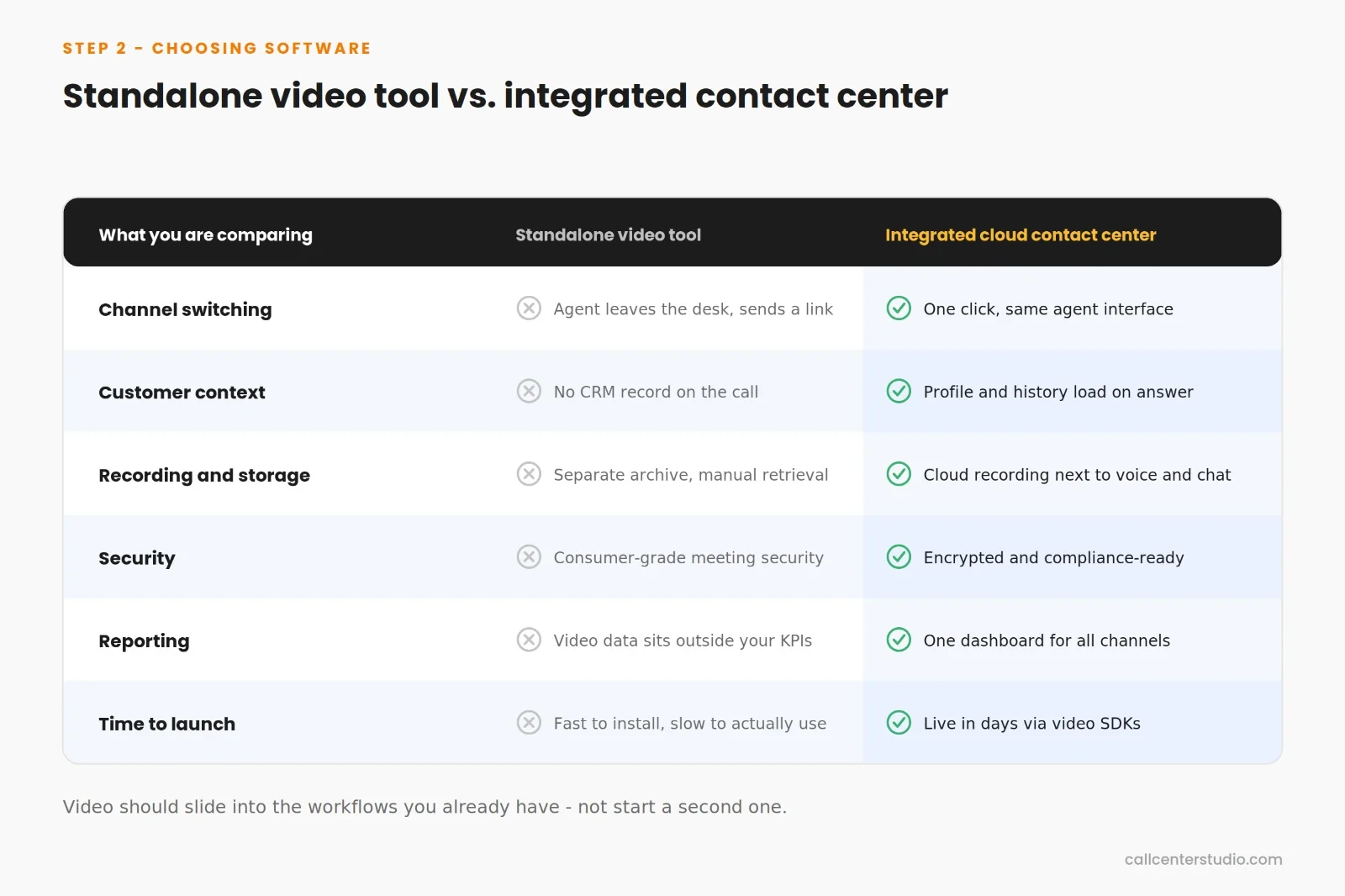
The real difference comes down to whether everything works together smoothly through secure cloud contact center software.
What should you look for?
- One-click switching between communication channels through a unified agent interface.
- Interactive screen sharing for showing instead of just telling.
- Cloud-based call recording and storage for quality checks, training, and compliance.
- Advanced data encryption to ensure every video interaction remains completely secure and compliant with industry standards.
- Omnichannel communication setup (the omnichannel setup means video just slides right into your existing workflows. You’re not starting from scratch; you’re building on what you already have).
Go for cloud-based contact center software that handles video chat integration seamlessly out of the box via reliable telephony and video SDKs. Messy hardware installations or complicated software deployment are not something you want to occupy yourself with. Most companies get video support up and running within days, not weeks.

Step 3: Make Video Part of Your Overall Strategy
With your integrated software up and running, you now need to define when this channel comes alive. What most contact centers get wrong is that they treat video as a separate “premium” channel. But the companies winning with video are using it as a strategic trigger point across the entire customer journey to enhance customer experience (CX).
Smart contact centers are automating video offers based on behavioral triggers such as:
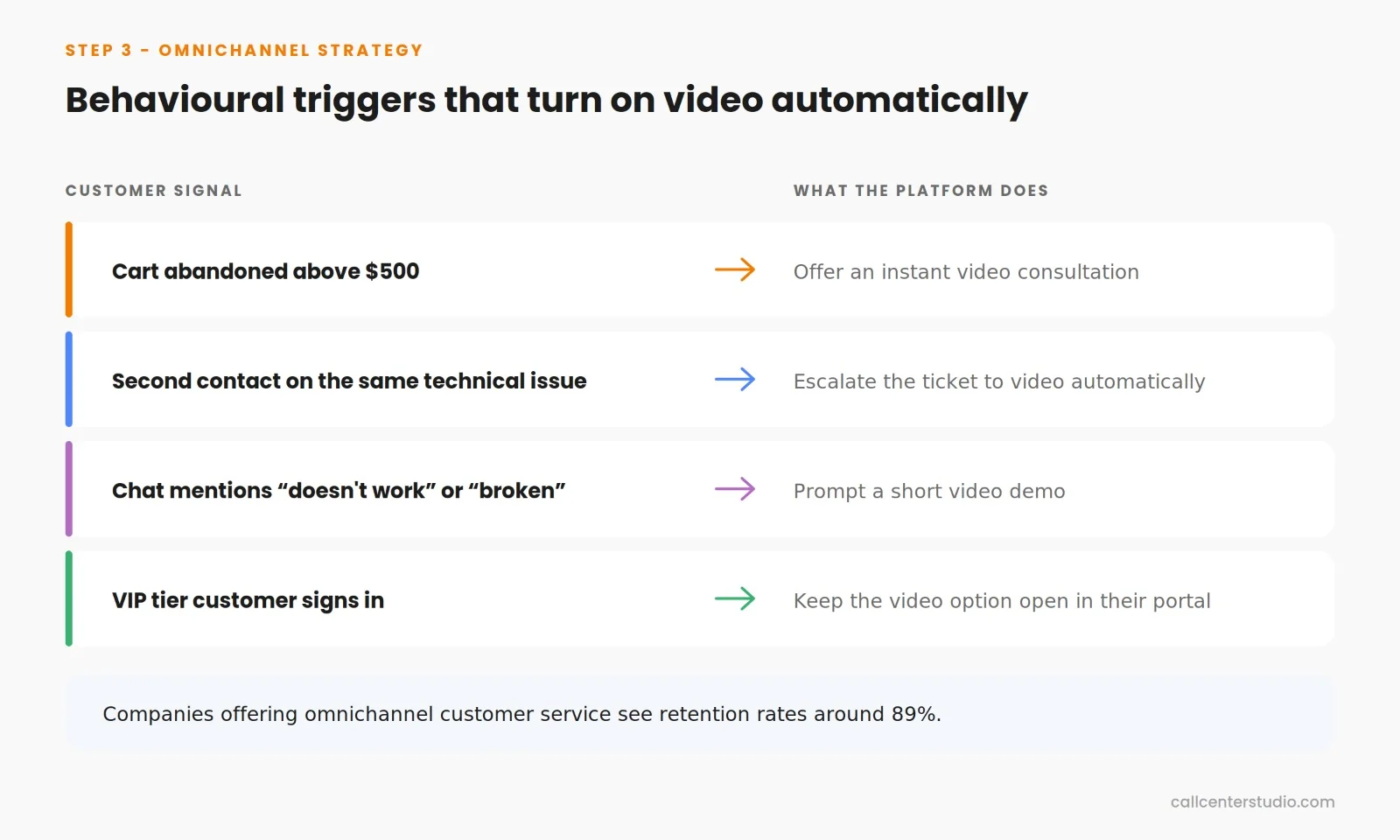
And get this: Companies offering omnichannel customer service see customer retention rates around 89%. That simply explain why customer experience optimization is so important
Step 4: Train Your Team to Rock Video Support
Now that your platform is up and your automated triggers are active, you’re ready for the first calls. But keep in mind, tech is just the infrastructure; it’s your people who create the magic. Since your agents are quite literally the face of your brand on screen, deep training becomes your most critical step.
Break agent training into three main areas:
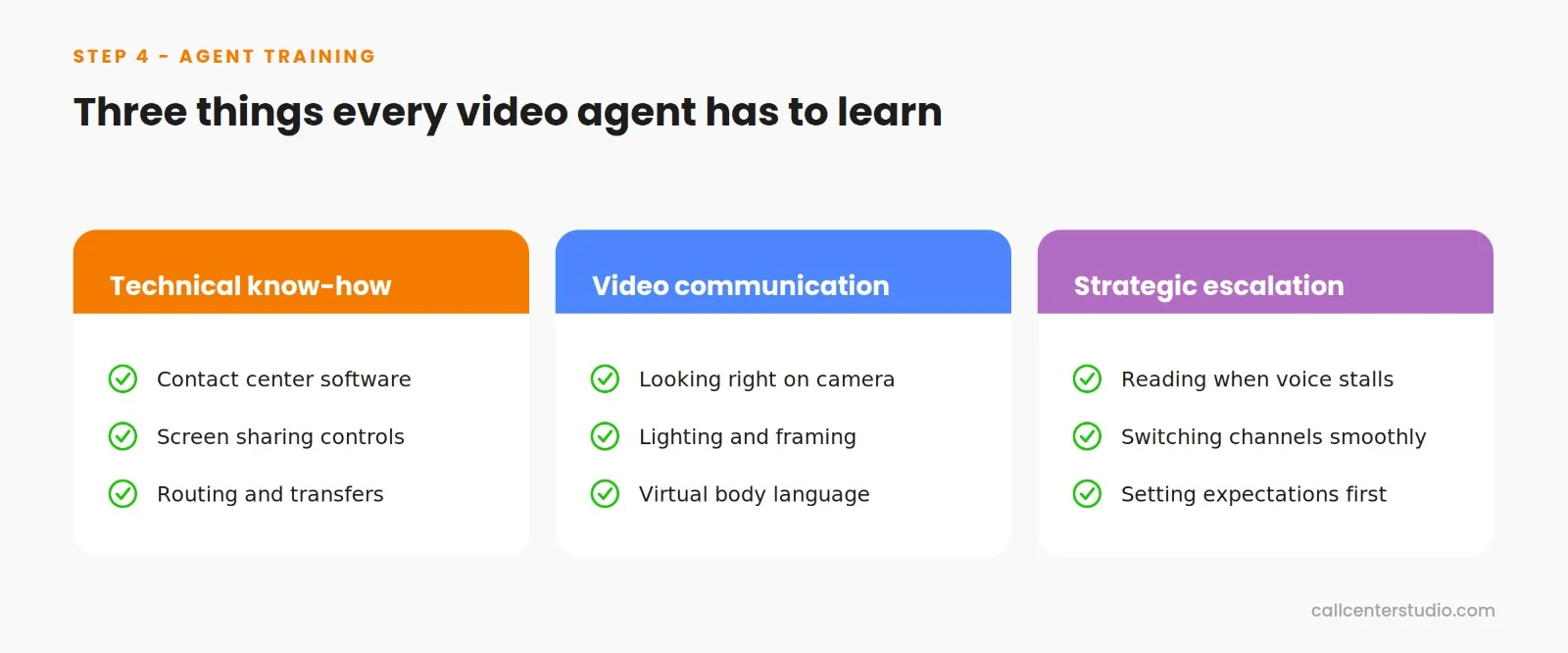
Think about the human advantage of video support. Visual cues and face-to-face interaction help agents build rapport faster, read customer emotions better, and solve complex problems more effectively. Many agents actually prefer video interactions because they can fix things quickly on the first contact and build more meaningful, empathetic relationships with customers.
You can try running role-playing exercises, recording practice sessions with feedback, and rolling out the video option gradually so agents can build their confidence before going all-in. This is where you really improve customer satisfaction (CSAT) by offering the right channel at the right time.

Step 5: Track Results, Improve, and Scale Up
You’ve audited, integrated, strategized, and trained. Now it’s time to flip the switch—but do it wisely. Continuous performance tracking is key to long-term success.
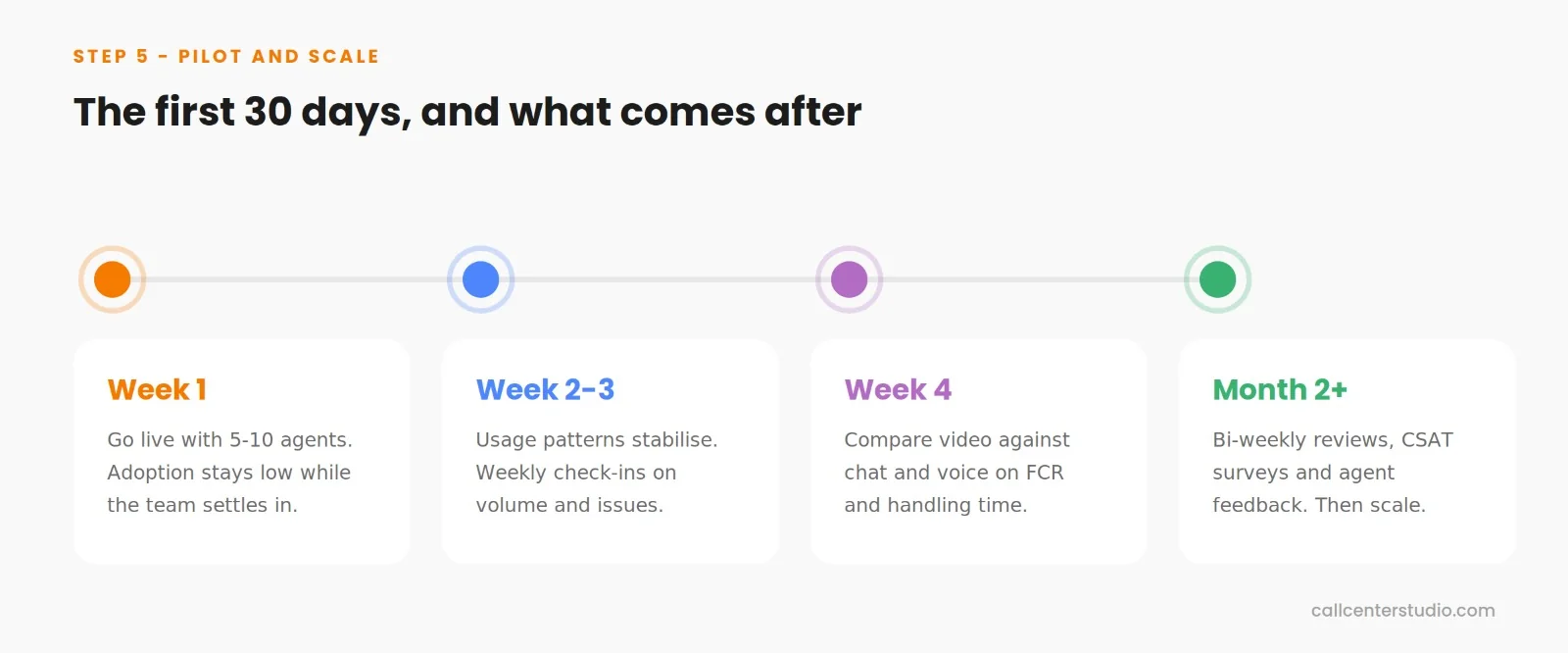
- Start with a pilot group of 5-10 agents for the first 30 days.
This gives you enough operational data to spot patterns without overwhelming your team. During week one, expect adoption rates to be low while agents get comfortable. By week three, you should see usage patterns stabilize.
- Set up weekly check-ins for the first month, then switch to bi-weekly once things are running smoothly.
Compare video interactions specifically against similar issues handled through chat or phone. You want to see if video actually improves your First Contact Resolution (FCR) rates and solves problems faster. Also, watch for time-of-day patterns because customers often prefer video during business hours but want to chat in the evenings.
- Set up continuous improvement cycles with post-interaction surveys, agent feedback sessions, and performance analytics reviews.
Your AI-powered contact center should provide solid, centralized reporting on video usage patterns, resolution rates, and how they correlate with overall customer satisfaction. All that data helps you make smarter decisions as you scale.
Quick Summary: How do I add video chat to a contact center?
If you are looking for a fast checklist to deploy video support, here are the core takeaways:
- Assess Infrastructure: Evaluate your current CRM setup, agent hardware, and internet bandwidth.
- Choose the Right Platform: Select a cloud-based contact center that offers browser-based WebRTC technology and native integrations.
- Align Omnichannel Strategy: Automate video triggers based on high-value interactions or complex escalation paths.
- Train Your Agents: Focus on platform features, visual communication skills, and video etiquette.
- Launch a Pilot & Track KPIs: Start with a small group of agents, monitor performance metrics, and scale up using AI-powered analytics.
Call Center Studio’s video support solution makes this game-changing channel available with:
- Browser-based, zero-download WebRTC technology,
- Comprehensive omnichannel integration that unifies voice, chat, and video, and
- Proven success across industries from healthcare to financial services to education.
The technology works, implementation is straightforward, and the business case is solid. The only question left is when you’ll take the step to level up your operation through Call Center Studio’s unified, cloud-native platform.
——————————————————————————————-
Frequently Asked Questions (FAQ)
1. Do customers need to download an app to use video calls?
No. Modern cloud contact center solutions utilize browser-based WebRTC (Web Real-Time Communication) technology. This allows customers to initiate or accept video calls instantly through their standard mobile or desktop web browsers (like Chrome, Safari, or Edge) with a single click, eliminating the friction of app downloads.
2. How does video chat integrate with our existing CRM?
A cloud-native contact center integrates via advanced APIs and SDKs. When a video call is triggered or answered, the platform automatically syncs with your CRM (like Salesforce, HubSpot, or Zoho), pulling up the customer’s profile, history, and ticket status into a single, unified agent dashboard.
3. What are the minimum internet bandwidth requirements for video support?
While standard voice calls require minimal data, high-definition video calls typically require a stable connection of at least 1.5 Mbps to 2 Mbps (both upload and download) per active agent stream. Most modern corporate networks easily handle this, but it is a critical checkmark during your initial infrastructure audit.
4. How do video calls impact First Contact Resolution (FCR) and CSAT?
By allowing agents to “show instead of tell” via screen sharing and camera context, video calls reduce misunderstandings. Industry data shows that integrating video into complex troubleshooting or high-value consultations can increase First Contact Resolution (FCR) by up to 20% and significantly boost overall Customer Satisfaction (CSAT) scores.